
Absorbing the complexity of grant funding at the NSF
The National Science Foundation (NSF) is a Federal Agency whose mission is to promote the progress of science by funding research in most fields of science and engineering.
NSF has a 20+ year old web application that the research community uses to submit proposals and manage grants.
Introduction
The National Science Foundation (NSF) is a Federal Agency whose mission is to promote the progress of science by funding research in most fields of science and engineering.
NSF has a 20+ year old web application that the research community uses to submit proposals and manage grants.
Project Brief
Due to NSF Policy and Federal Mandates, the complexity around proposal submission isn’t going anywhere.
How can we absorb this complexity to make this process be more seamless, more transparent?
Challenges
Research.gov needed to be implemented so that it would work nicely with the other legacy systems that NSF uses to process and review the proposals.
Prioritizing functional features vs. usability enhancements to keep in mind the strict deadlines from our stakeholders and the limited bandwidth of our technical teams.
Team
Research.gov worked in a SAFe Agile environment with 3 dedicated scrum teams, each working on a feature of the web application. The scrum teams are composed of:
1 UX Designer (Me)
1 Business Analyst/Scrum Master
2 FE developers, 2-4 BE developers, 2 QA Testers, 1 Tech Lead
* I work closely with other UX teams within NSF to review any of our UX work to ensure consistency across NSF’s suite of applications.
Understanding the complexity 😳
“When complexity piles up, progress slows down, and decisions stall”
Understanding the complexity 😳
“When complexity piles up, progress slows down, and decisions stall”
Understanding the complexity 😳
“When complexity piles up, progress slows down, and decisions stall”
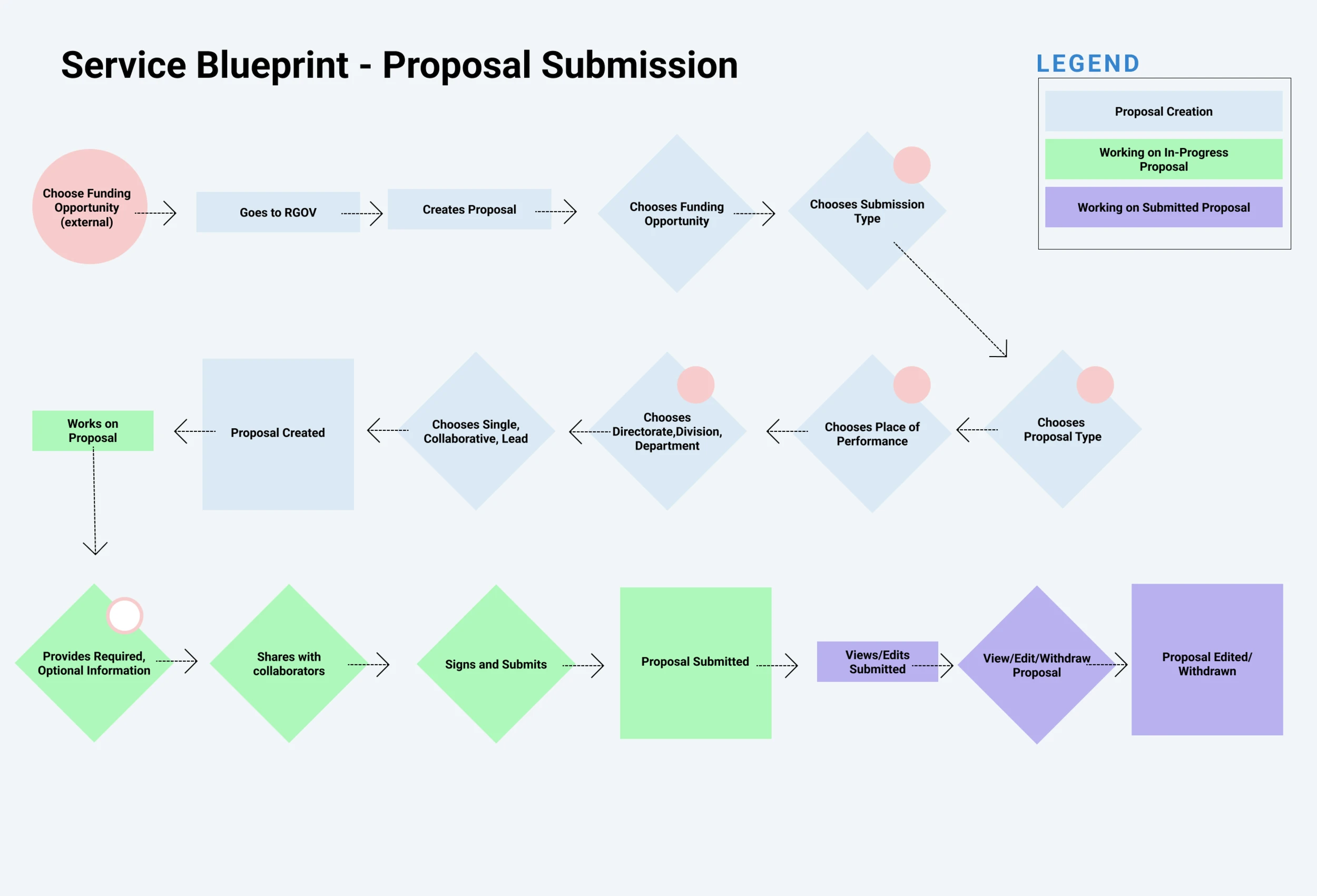
1. Learn the logic of Proposal Submission
Together with the Business Analyst, we went through existing documentation and spoke with stakeholders and subject matter experts to better understand the workflow of submitting proposals from an internal perspective.
1. Learn the logic of Proposal Submission
Together with the Business Analyst, we went through existing documentation and spoke with stakeholders and subject matter experts to better understand the workflow of submitting proposals from an internal perspective.
What we learned:
There is a number of criteria that a proposal needs to meet such as formatting requirements, different types of proposals, following a certain order of operations, etc.
A critical document, the funding opportunity, contains all of the proposal requirements. The data of this document is stored on another application.
What we learned:
There is a number of criteria that a proposal needs to meet such as formatting requirements, different types of proposals, following a certain order of operations, etc.
A critical document, the funding opportunity, contains all of the proposal requirements. The data of this document is stored on another application.
2. UX review of legacy systems
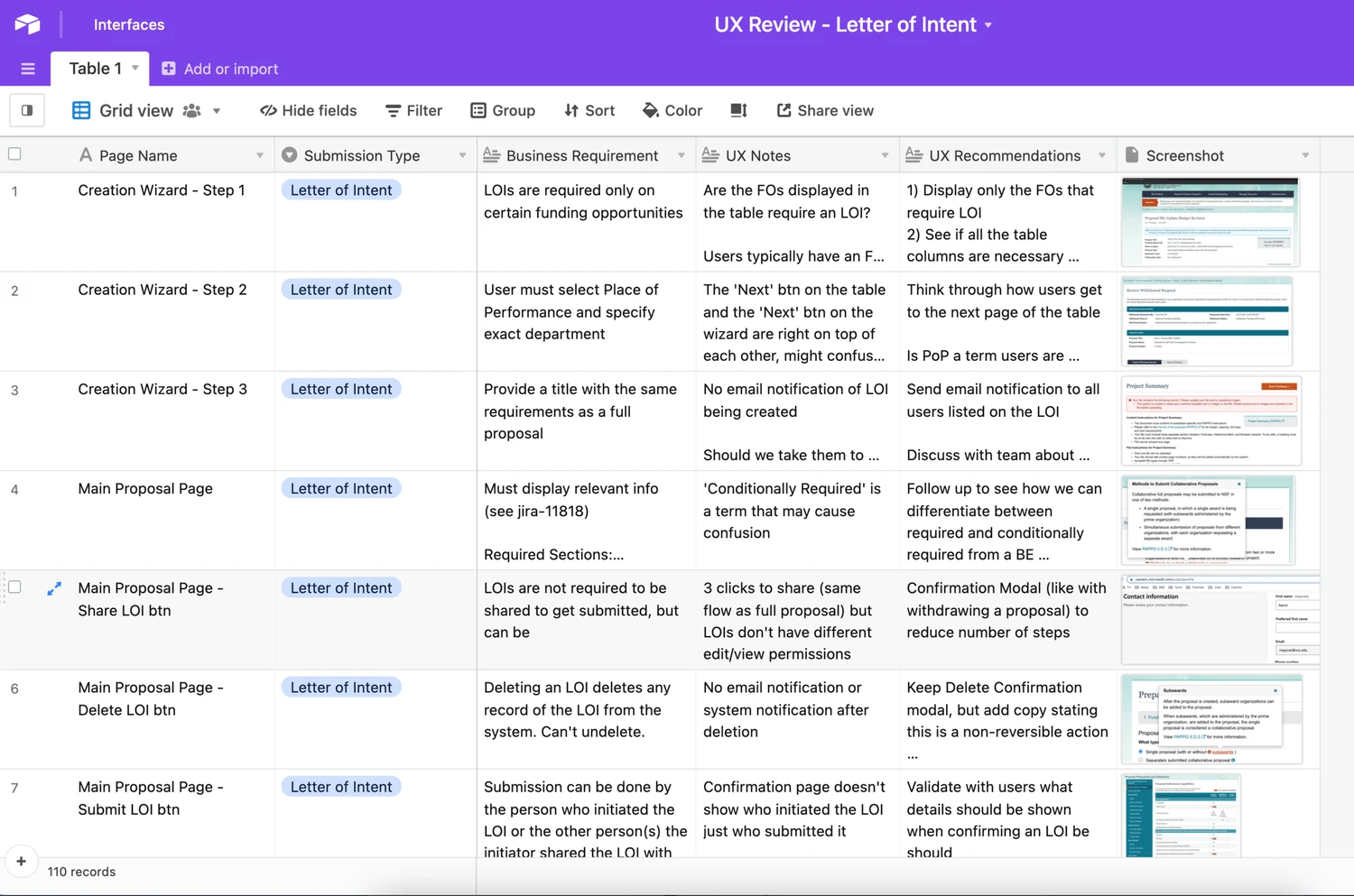
I would audit the functionality of the legacy system to better understand how users are currently submitting proposals to the NSF. This exercise helped identify potential areas of opportunities for UX improvements.
2. UX review of legacy systems
I would audit the functionality of the legacy system to better understand how users are currently submitting proposals to the NSF. This exercise helped identify potential areas of opportunities for UX improvements.
What we learned:
Most input fields were freeform text fields
The status of the submitted proposal is only shown in email notifications
Images, headings, and menus failed to meet WCAG standards
What we learned:
Most input fields were freeform text fields
The status of the submitted proposal is only shown in email notifications
Images, headings, and menus failed to meet WCAG standards
3. Conduct user interviews
I prepared an interview script to uncover any other needs that our users may have. The script went along with lo-fi wireframes or screenshots of the legacy system to help focus the discussion. But there were also open-ended questions where users can bring to light unrelated issues we may have overlooked completely.
3. Conduct user interviews
I prepared an interview script to uncover any other needs that our users may have. The script went along with lo-fi wireframes or screenshots of the legacy system to help focus the discussion. But there were also open-ended questions where users can bring to light unrelated issues we may have overlooked completely.
What we learned:
More experienced users know by trial-and-error the fastest way to get a proposal submitted, less experienced users were calling the helpdesk to proceed with the submission.
Funding opportunities can be found on research.gov, but users usually find it elsewhere. Users typically apply to the same funding opportunity every year.
Users stated they spend more time than they would like on proposal-related tasks.
What we learned:
More experienced users know by trial-and-error the fastest way to get a proposal submitted, less experienced users were calling the helpdesk to proceed with the submission.
Funding opportunities can be found on research.gov, but users usually find it elsewhere. Users typically apply to the same funding opportunity every year.
Users stated they spend more time than they would like on proposal-related tasks.
Initial Insights
Initial Insights
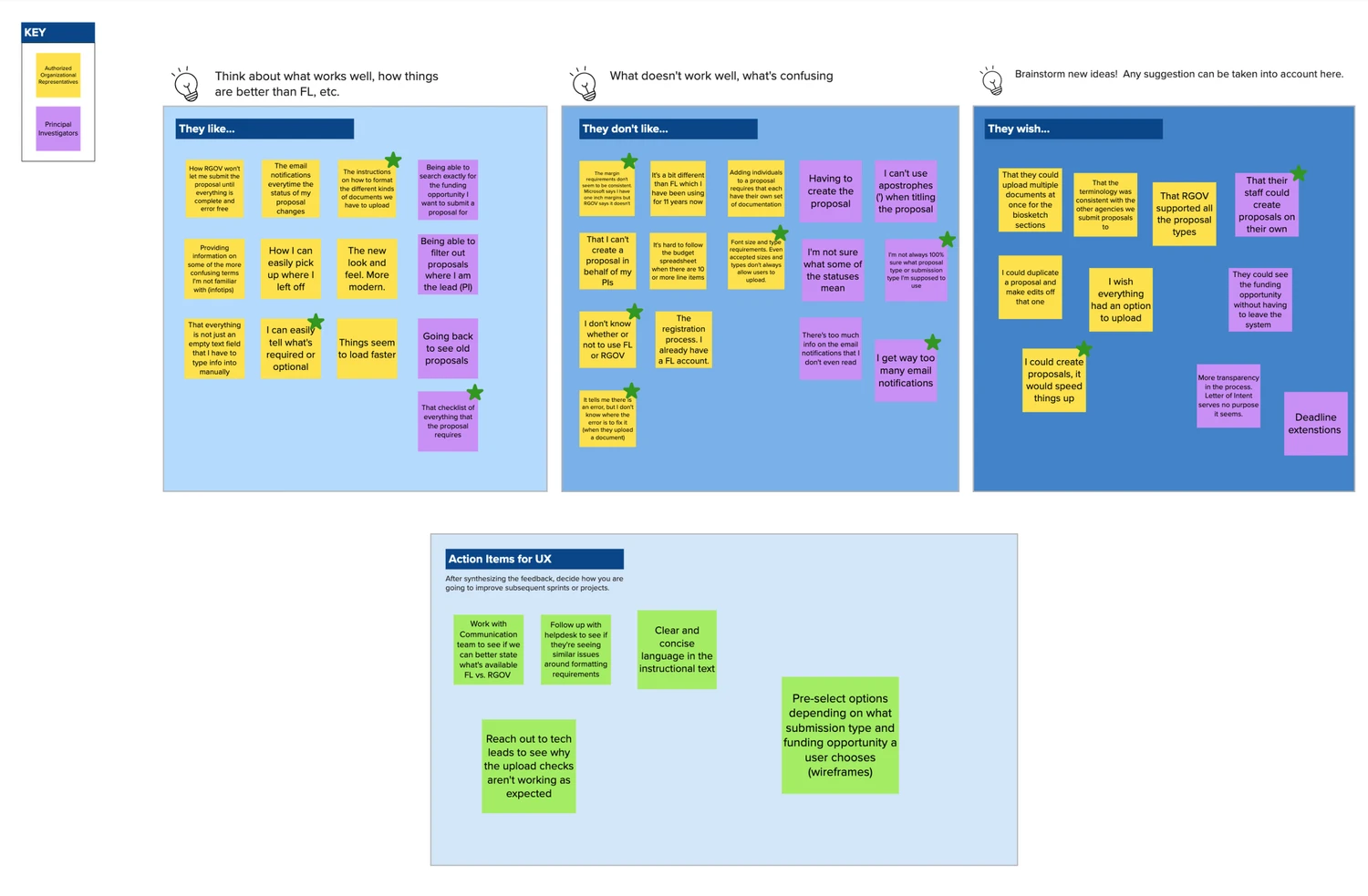
After the initial research efforts, I met with the UX team to synthesize all the data collected. Together, we were able to summarize our findings into key insights:
After the initial research efforts, I met with the UX team to synthesize all the data collected. Together, we were able to summarize our findings into key insights:
The funding opportunity determines the requirements a proposal has, but the system puts the burden on the users to know those requirements when submitting a proposal.
Users new to creating proposals found themselves asking either the helpdesk or more seasoned colleagues when stuck somewhere because of unclear instructions.
Research institutions submit proposals to other agencies than NSF.
The language used between other funding agencies are not consistent with each other.
Users don’t want to spend a lot of time on any given proposal system. They want to be in-and-out and onto doing actual research or other administrative tasks.
Principal Investigators shared their login info with their admin team or graduate students so that they have the right permissions to create and submit the proposal.
The funding opportunity determines the requirements a proposal has, but the system puts the burden on the users to know those requirements when submitting a proposal.
Users new to creating proposals found themselves asking either the helpdesk or more seasoned colleagues when stuck somewhere because of unclear instructions.
Research institutions submit proposals to other agencies than NSF.
The language used between other funding agencies are not consistent with each other.
Users don’t want to spend a lot of time on any given proposal system. They want to be in-and-out and onto doing actual research or other administrative tasks.
Principal Investigators shared their login info with their admin team or graduate students so that they have the right permissions to create and submit the proposal.
Absorbing the complexity 🧐
“In the face of complexity, simplicity is not the goal, but clarity”
Absorbing the complexity 🧐
“In the face of complexity, simplicity is not the goal, but clarity”
Absorbing the complexity 🧐
“In the face of complexity, simplicity is not the goal, but clarity”
4. Pre-selecting Options / Disabling Invalid Options
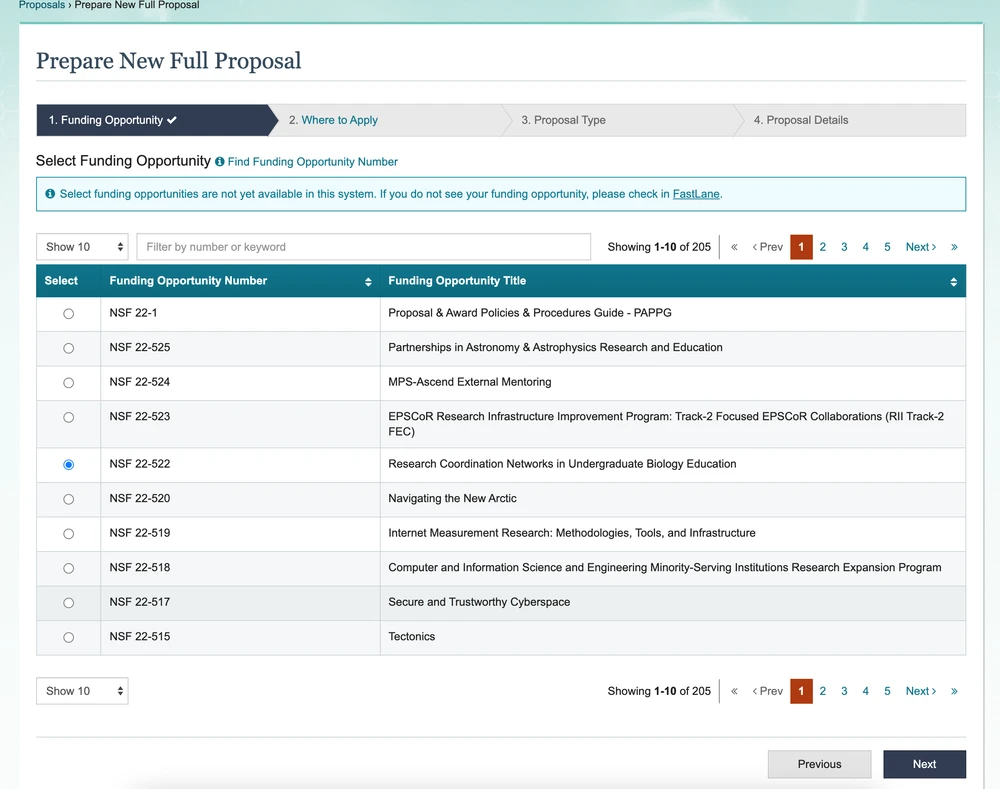
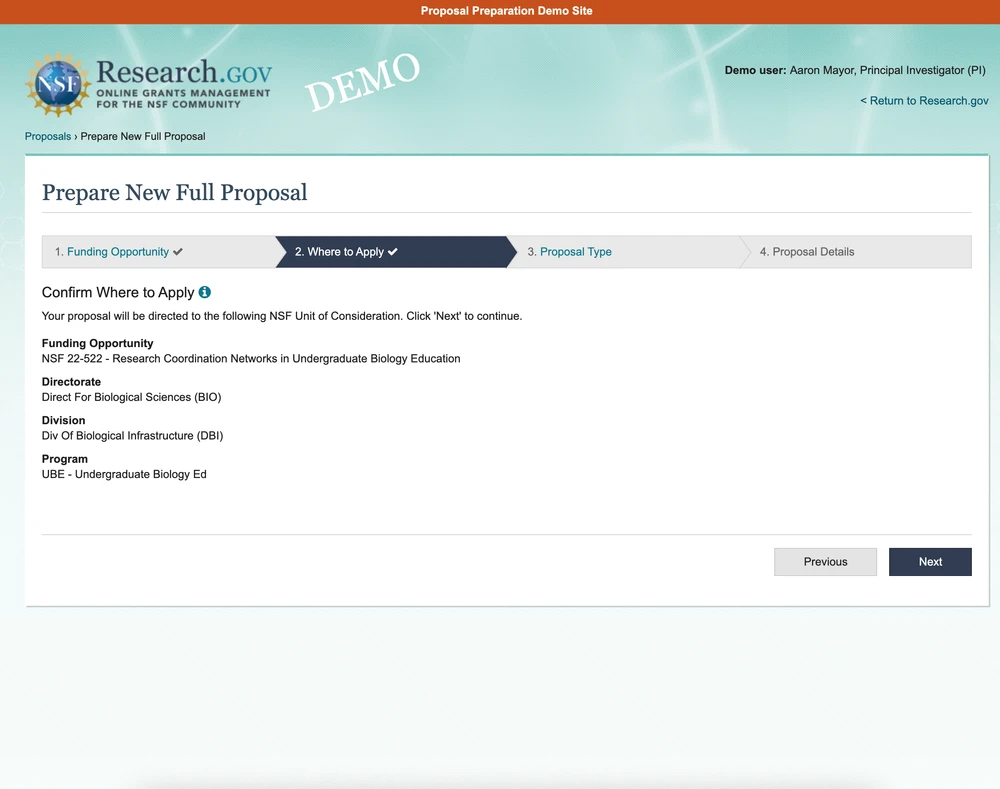
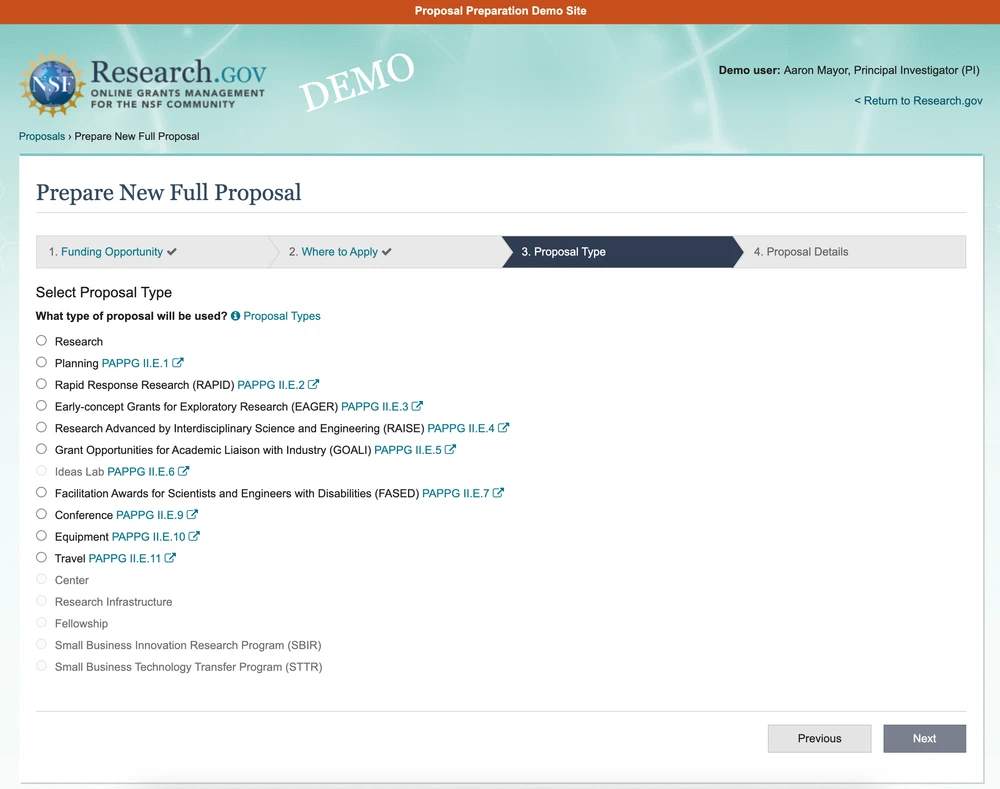
This was to lift the burden from the users of having to go back and read through the funding opportunity to know exactly what they needed to provide.
One example of this is that we have our users go through a 4-step wizard to prepare a new proposal allows users to stay within the NSF ecosystem since we have presented all the required information to them.
4. Pre-selecting Options / Disabling Invalid Options
This was to lift the burden from the users of having to go back and read through the funding opportunity to know exactly what they needed to provide.
One example of this is that we have our users go through a 4-step wizard to prepare a new proposal allows users to stay within the NSF ecosystem since we have presented all the required information to them.
Benefit:
Users have stated that this method of creating a proposal speeds up the process considerably presumably because all their options are right there in front of them.
Benefit:
Users have stated that this method of creating a proposal speeds up the process considerably presumably because all their options are right there in front of them.
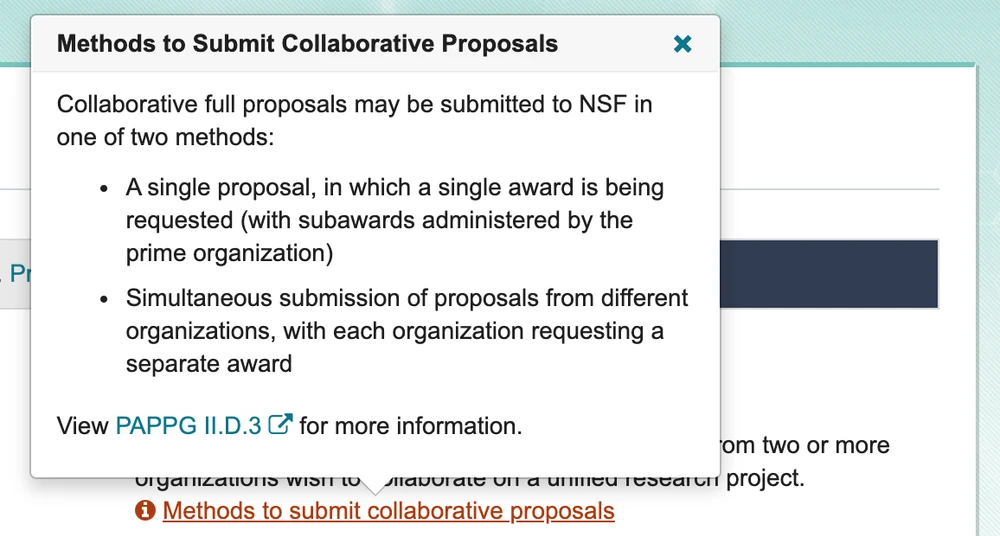
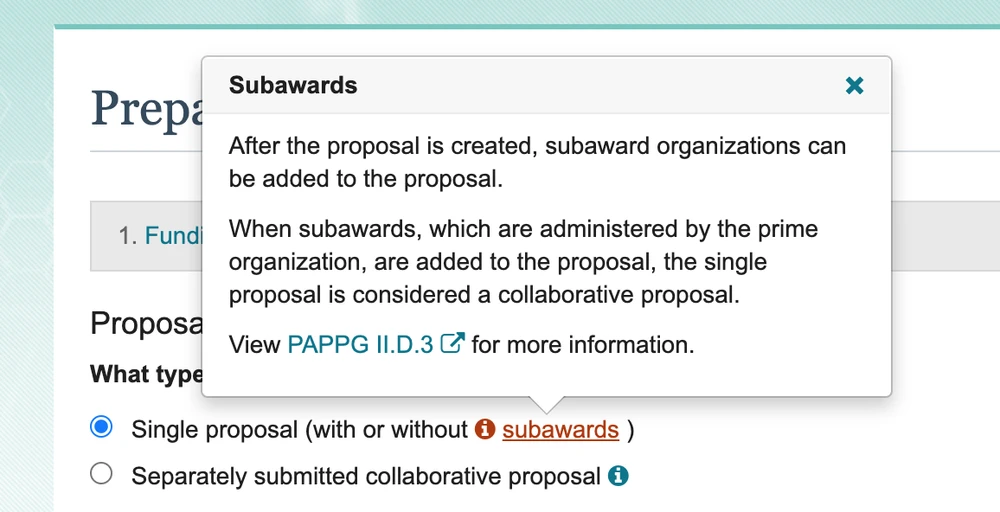
5. Clear messaging and timely system notifications
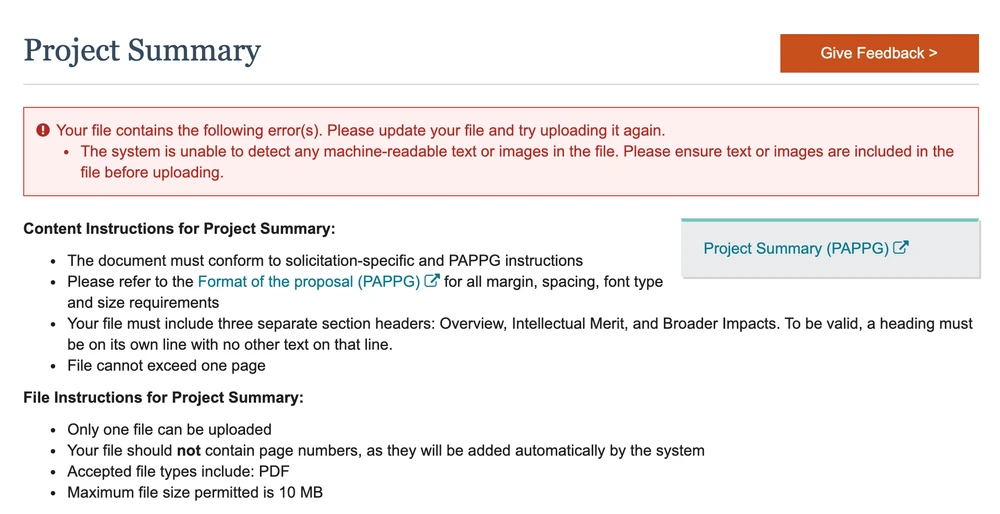
Clearer instructional text, warning/error system notifications were designed to prevent users from getting stuck in the submission process.
System notifications are triggered by certain actions of the user, such as uploading a document, a success message or warning/error message will appear to let the user know that their action has been acknowledged and processed.
5. Clear messaging and timely system notifications
Clearer instructional text, warning/error system notifications were designed to prevent users from getting stuck in the submission process.
System notifications are triggered by certain actions of the user, such as uploading a document, a success message or warning/error message will appear to let the user know that their action has been acknowledged and processed.
Benefit:
Our help desk has reported that they have been receiving less issues of having to explain how to submit a proposal
Benefit:
Our help desk has reported that they have been receiving less issues of having to explain how to submit a proposal
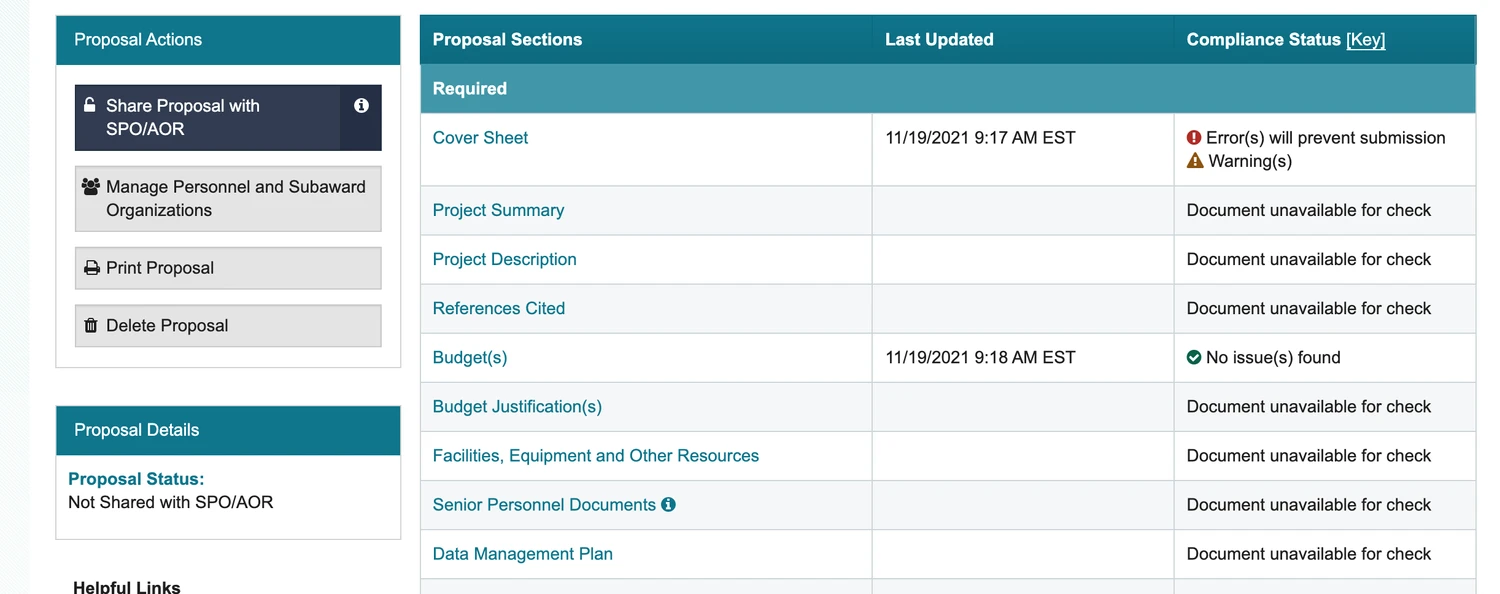
6. Checklist of Required Sections
Visual indications that conveyed whether a proposal section has been completed or has errors that needs to be addressed.
This is especially useful to our admin users who are juggling multiple proposals from multiple research teams and for proposals that have multiple collaborators.
6. Checklist of Required Sections
Visual indications that conveyed whether a proposal section has been completed or has errors that needs to be addressed.
This is especially useful to our admin users who are juggling multiple proposals from multiple research teams and for proposals that have multiple collaborators.
Benefit:
Users can now quickly scan what is required or optional and if that section is ready for submission.
Benefit:
Users can now quickly scan what is required or optional and if that section is ready for submission.
Next steps
With the updated UI addressing pain points that came up during the research phase, we wanted to validate our design decisions with both internal stakeholders and actually end users.
Internal stakeholders, who did not have to submit grant proposals themselves and who were long-tenured employees at NSF, would need to hear how the current process is being perceived.
End users were very receptive to having their feedback heard and excited to see what sorts of improvements we had in store for them.
With the updated UI addressing pain points that came up during the research phase, we wanted to validate our design decisions with both internal stakeholders and actually end users.
Internal stakeholders, who did not have to submit grant proposals themselves and who were long-tenured employees at NSF, would need to hear how the current process is being perceived.
End users were very receptive to having their feedback heard and excited to see what sorts of improvements we had in store for them.
Validating the work ✅
“Good design feels right. Validated design is right.”
Validating the work ✅
“Good design feels right. Validated design is right.”
Validating the work ✅
“Good design feels right. Validated design is right.”
7. User Personas
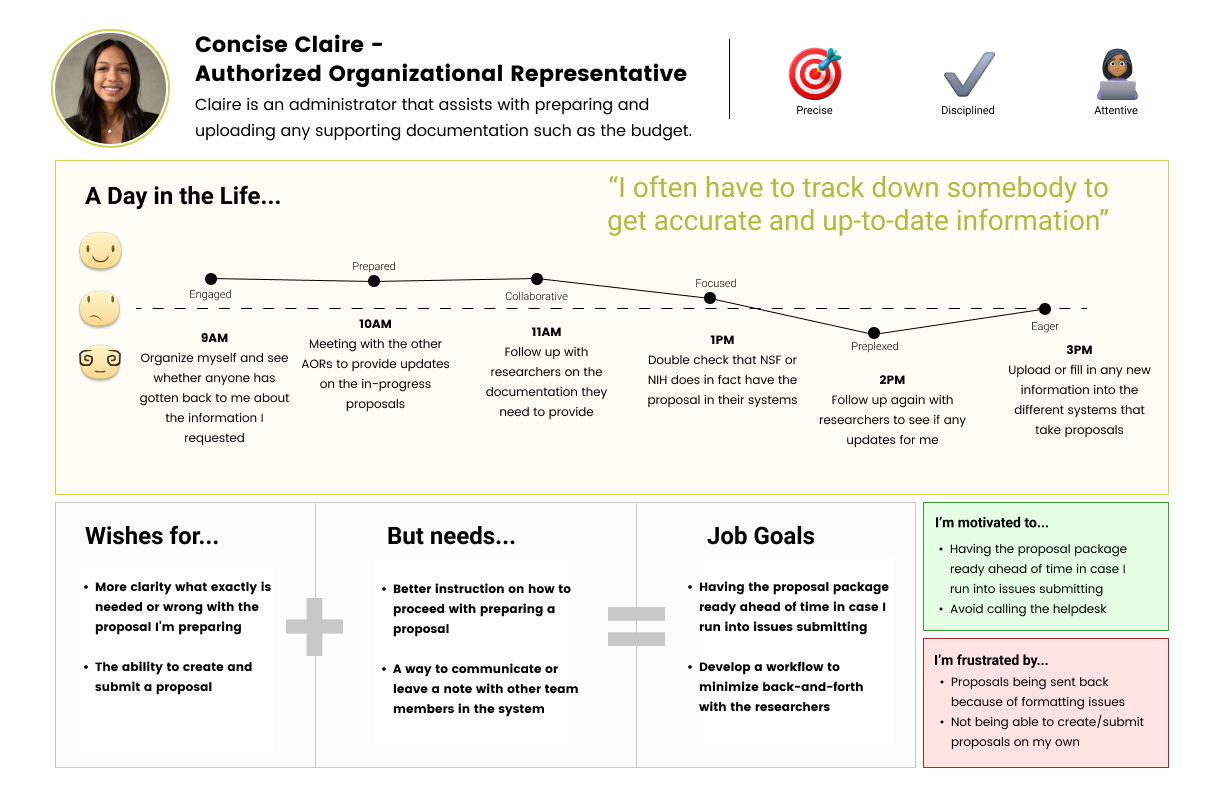
When pushing for UX enhancements, it helps to showcase who the users actually are to fully capture and communicate their specific goals and characteristics. In this case, we found that we had two main user groups: researchers and administrators
7. User Personas
When pushing for UX enhancements, it helps to showcase who the users actually are to fully capture and communicate their specific goals and characteristics. In this case, we found that we had two main user groups: researchers and administrators
What we learned:
For researchers, the proposal aspect is a very small part of their job responsibilities and workload.
Administrators support multiple research teams thus multiple proposals but also have other duties not related to proposal submission
Proposal submission becomes a higher priority for both user types when deadlines are 3-4 weeks away.
What we learned:
For researchers, the proposal aspect is a very small part of their job responsibilities and workload.
Administrators support multiple research teams thus multiple proposals but also have other duties not related to proposal submission
Proposal submission becomes a higher priority for both user types when deadlines are 3-4 weeks away.
8. Usability Testing
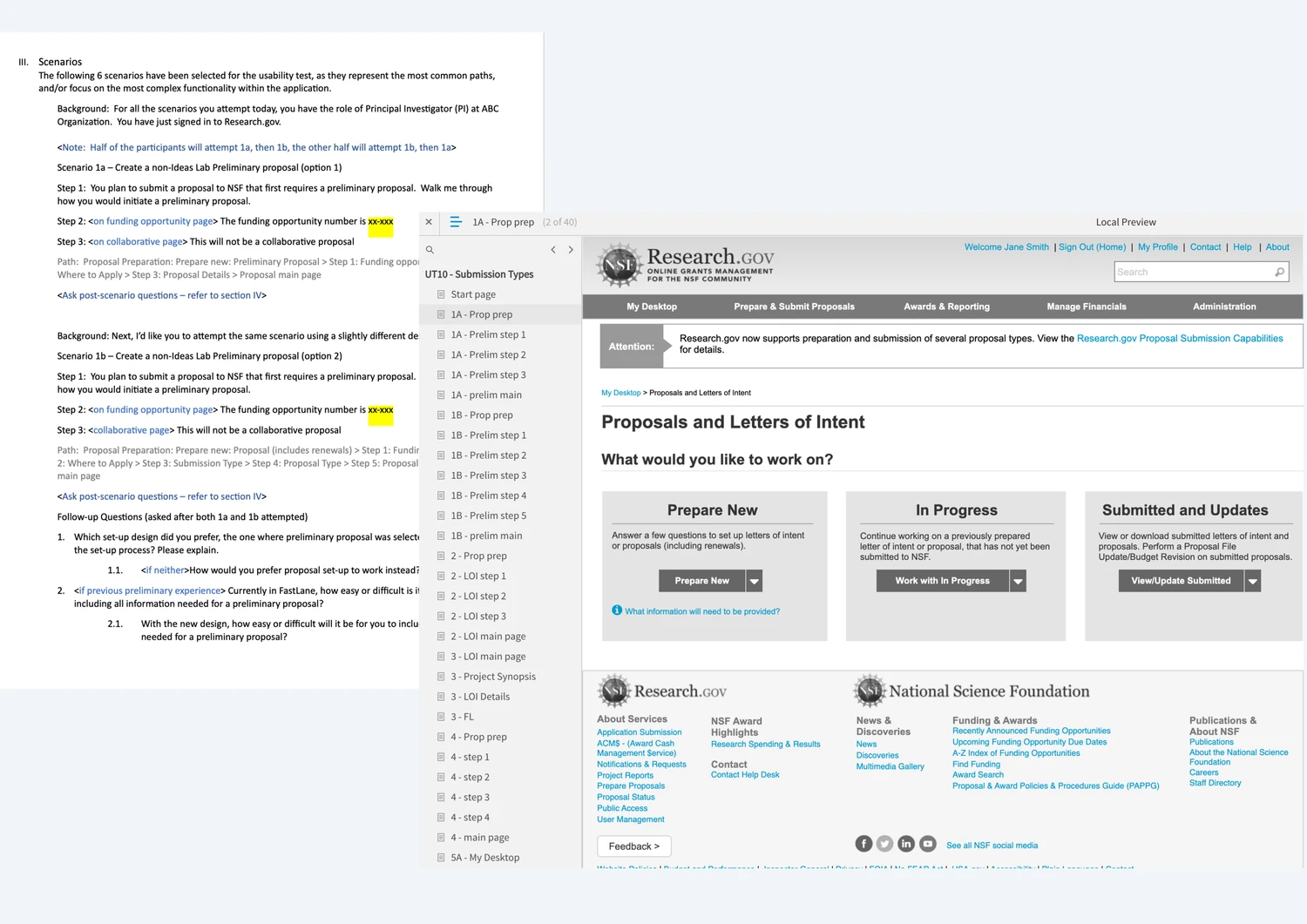
To validate our initial design decisions, we created low-fidelity prototypes and a usability test script to conduct usability testing with.
For the usability sessions, we asked our users to complete tasks such as create a certain type of proposal, find a certain piece of information in a proposal, etc.
Our goals were to validate design decisions around user flows, get feedback on how content was presented, and uncover any other needs we may have missed.
8. Usability Testing
To validate our initial design decisions, we created low-fidelity prototypes and a usability test script to conduct usability testing with.
For the usability sessions, we asked our users to complete tasks such as create a certain type of proposal, find a certain piece of information in a proposal, etc.
Our goals were to validate design decisions around user flows, get feedback on how content was presented, and uncover any other needs we may have missed.
What we learned:
Reviewing and confirming choices were important to users to make sure they’re submitting a proposal to the right funding opportunity.
Some language across the application were unclear.
Proposals take days, if not weeks, to complete. A lot of back and forth happens between research collaborators before a proposal can be finalized.
What we learned:
Reviewing and confirming choices were important to users to make sure they’re submitting a proposal to the right funding opportunity.
Some language across the application were unclear.
Proposals take days, if not weeks, to complete. A lot of back and forth happens between research collaborators before a proposal can be finalized.
Outcomes 🎉
"Focus on the process, and the outcome will take care of itself."
Outcomes 🎉
"Focus on the process, and the outcome will take care of itself."
Outcomes 🎉
"Focus on the process, and the outcome will take care of itself."
While not every UX recommendation is implemented immediately, quite a few are making it out to the users. We’ve received feedback from both the users and client that the overall experience is smoother than with the old system.
Clearer, more concise language across the web application has led to less helpdesk tickets from users looking for assistance.
While not every UX recommendation is implemented immediately, quite a few are making it out to the users. We’ve received feedback from both the users and client that the overall experience is smoother than with the old system.
Clearer, more concise language across the web application has led to less helpdesk tickets from users looking for assistance.
Next steps:
Work with developers and QA to help oversee the UI implementation of pages that are being developed
Work with business analysts and stakeholders on the next feature on the product roadmap
Work with UX team to work on any ad hoc requests from other departments and to contribute to our design system and design guidelines
Work with UX team and tech leads to address performance issues that may need new design solutions.
Next steps:
Work with developers and QA to help oversee the UI implementation of pages that are being developed
Work with business analysts and stakeholders on the next feature on the product roadmap
Work with UX team to work on any ad hoc requests from other departments and to contribute to our design system and design guidelines
Work with UX team and tech leads to address performance issues that may need new design solutions.